Pausing a System's Harvests
A pause stops new harvests for one system, and says so everywhere that system’s facts are read. Everything it already landed stays exactly where it is: the records are held, and every reader is told they are not current.
When to pause
Section titled “When to pause”You would pause a system when reading from it is worse than not reading from it for a while:
- Its data disagrees with another system, and you want to stop the disagreement spreading into your registers while someone reconciles it.
- The system is being rebuilt, migrated, or re-implemented at the vendor, so anything harvested now is work you would throw away.
- A field you rely on is wrong at the source, and you would rather work from the last good figures than from wrong ones.
A pause is not a disconnect. Credentials, bindings and the connection itself are untouched, which is why starting again is one click.
Pause it
Section titled “Pause it”You need permission to manage systems (connectors:manage), which admins hold. Everyone else can always see that a system is paused; only the change needs the permission.
-
Open the system’s page
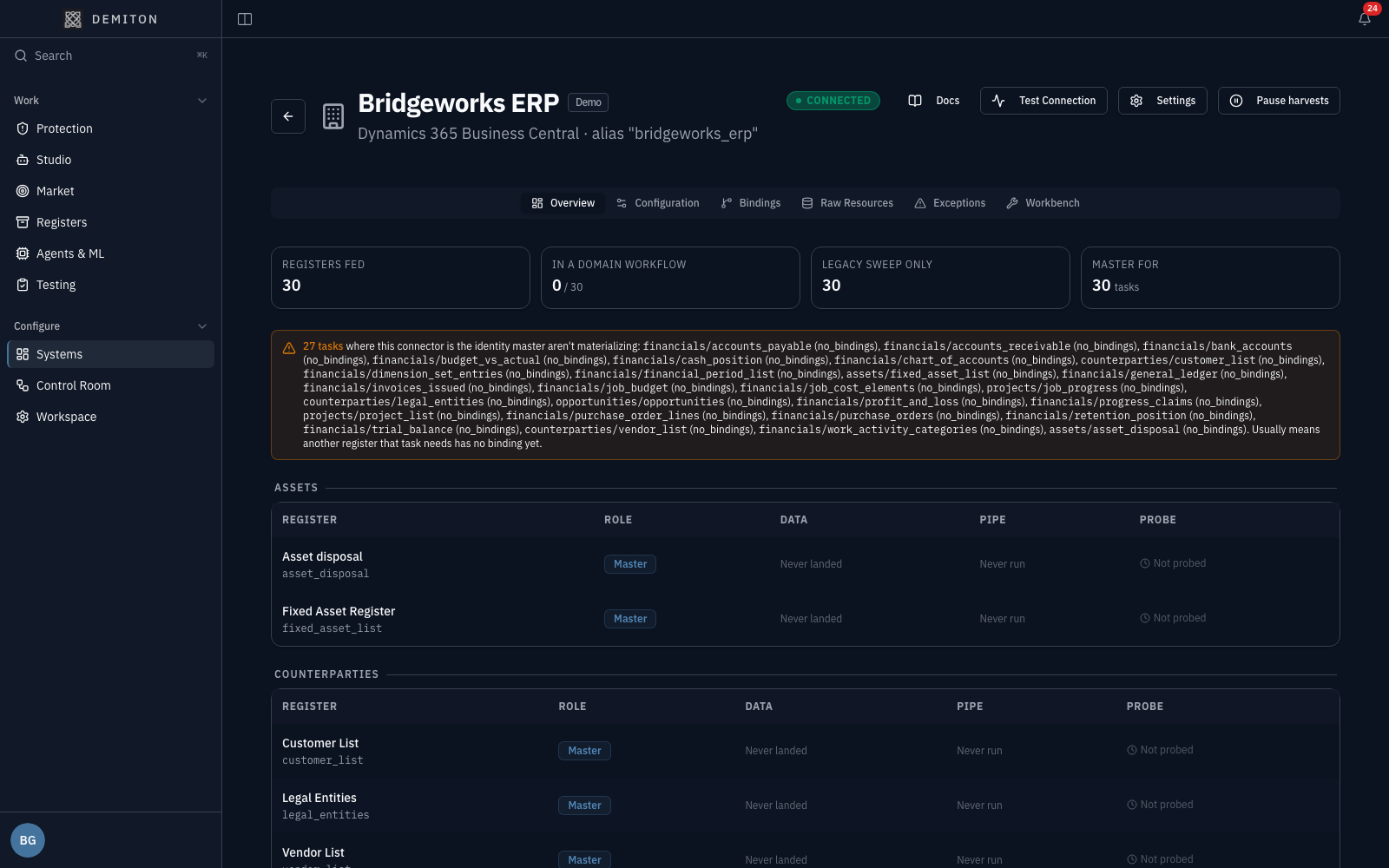
Section titled “Open the system’s page”Choose Systems under Configure in the sidebar, then the system itself. Its page carries the actions for that system, including Pause harvests in the header.
-
Give a reason
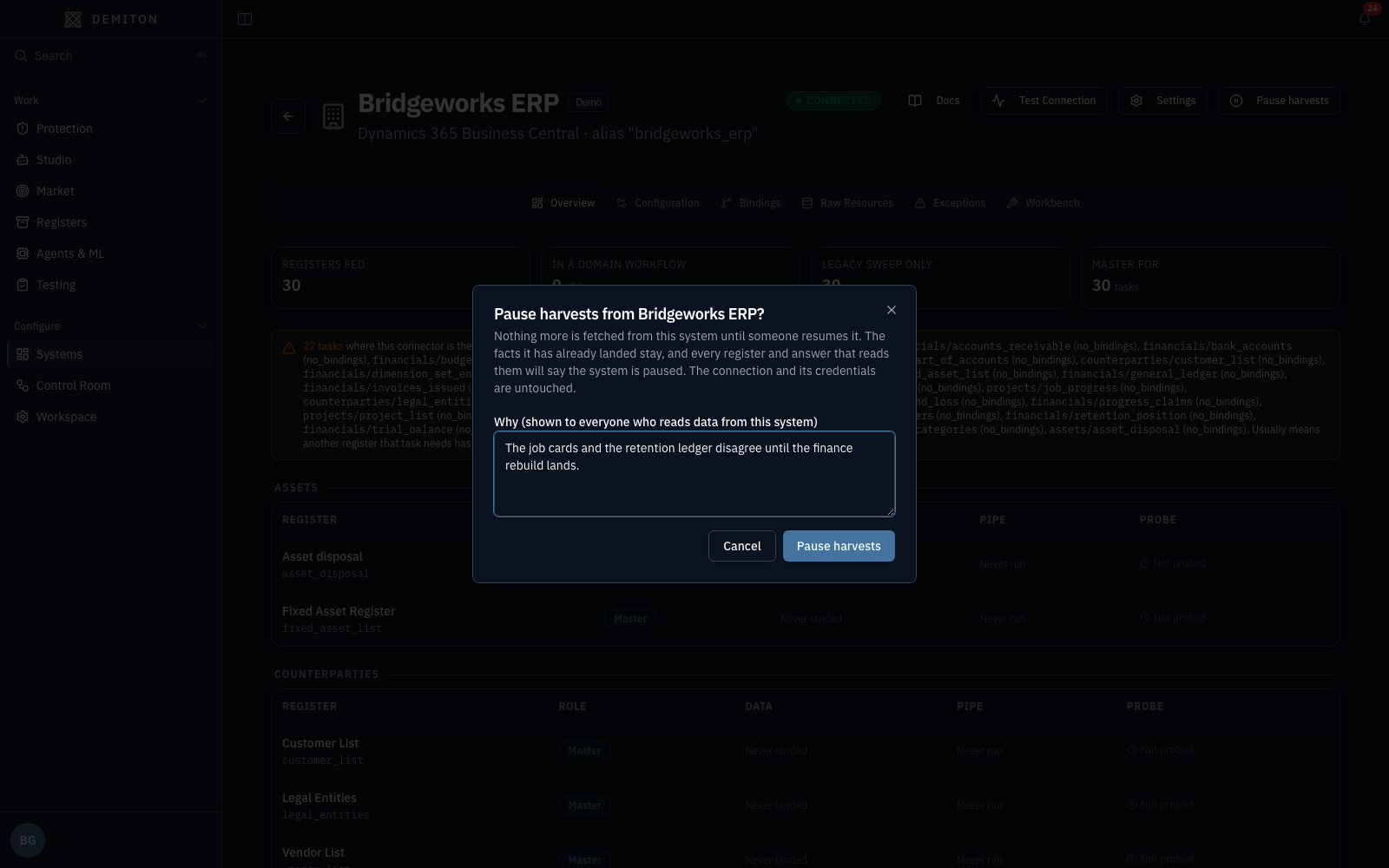
Section titled “Give a reason”Click Pause harvests and say why, in your own words. The reason is not an internal note: it is what a colleague reading a figure from this system is shown, so write it for them. It must be at least ten characters, and the confirm button stays disabled until it is.
-
Confirm
Section titled “Confirm”The page turns over to its paused state: a Harvests paused chip beside the system’s name, a banner naming who paused it and when with the reason quoted verbatim, and Resume harvests where the pause was.
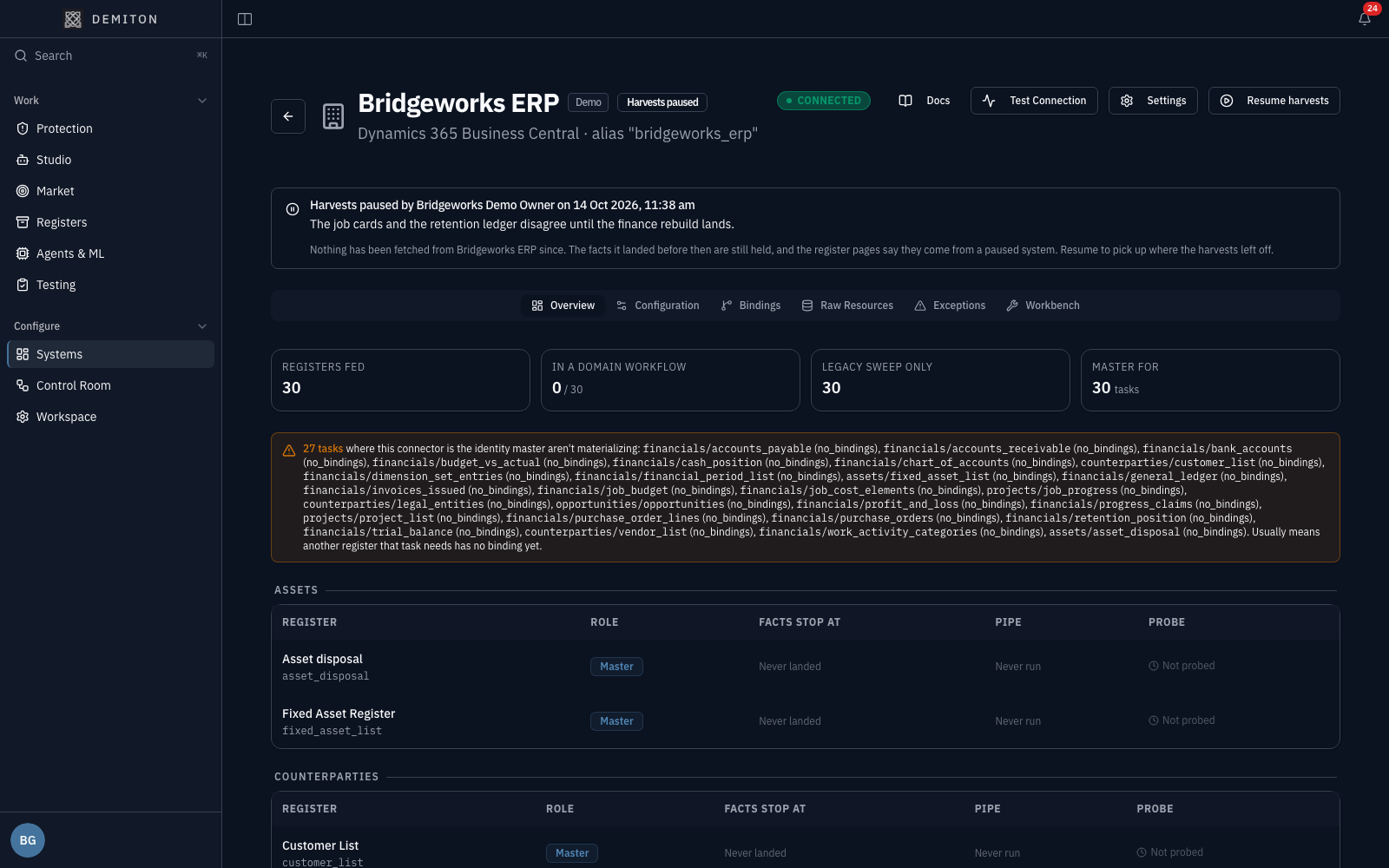
The bindings table on that page also changes: the column that shows when each register next runs reads Facts stop at, because there is no next run while the system is paused.
What everyone else sees
Section titled “What everyone else sees”The point of the reason is that the pause travels with the data. Three places carry it.
The register’s Source tab
Section titled “The register’s Source tab”Open the register the system feeds, choose its Source tab, and the card says which system is paused, who paused it, when, and why, with the facts it is holding:
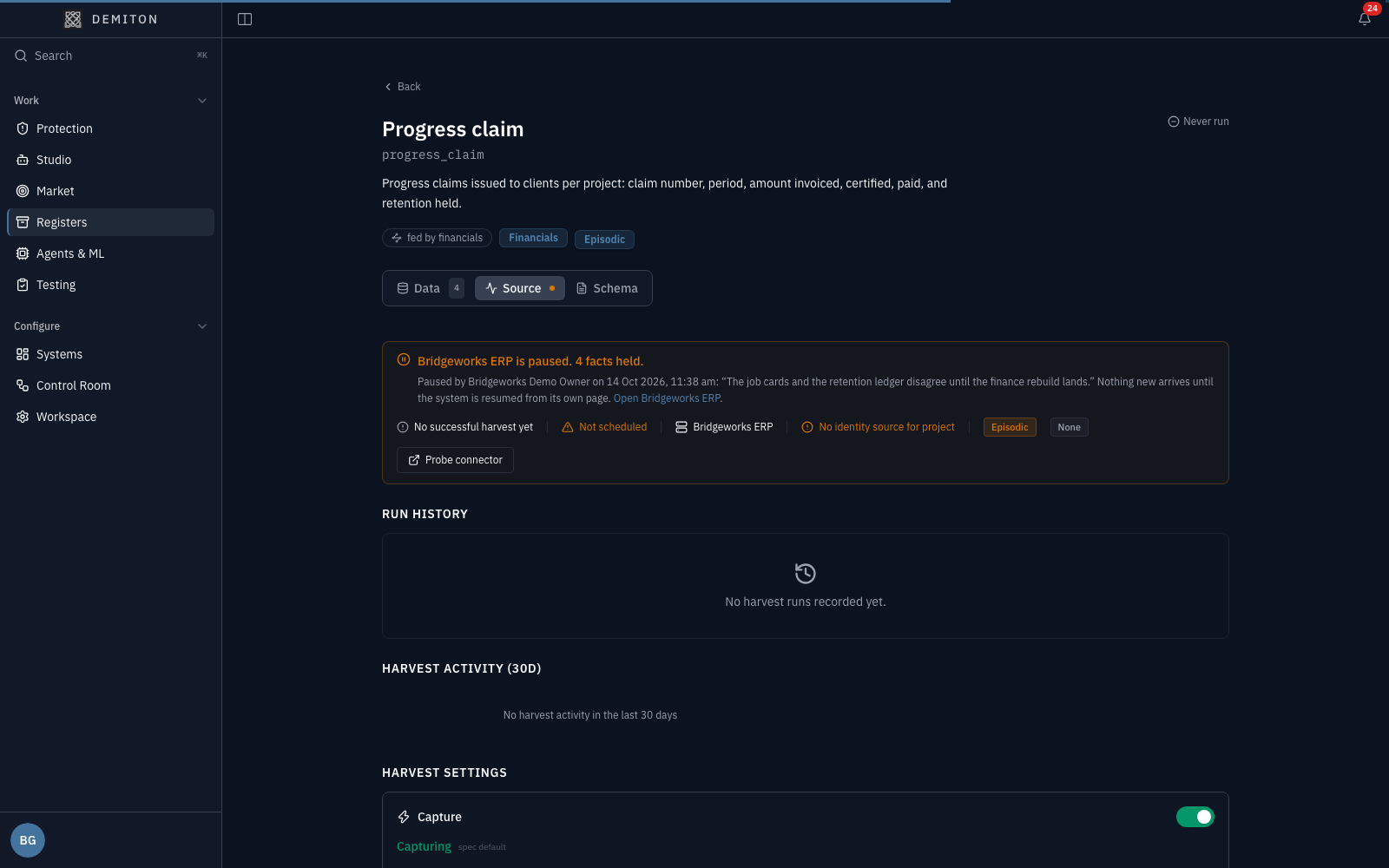
Refresh and Schedule are not offered there while every system feeding the register is paused: offering them would be offering to do the thing that was just stopped.
Studio, and anything you ask
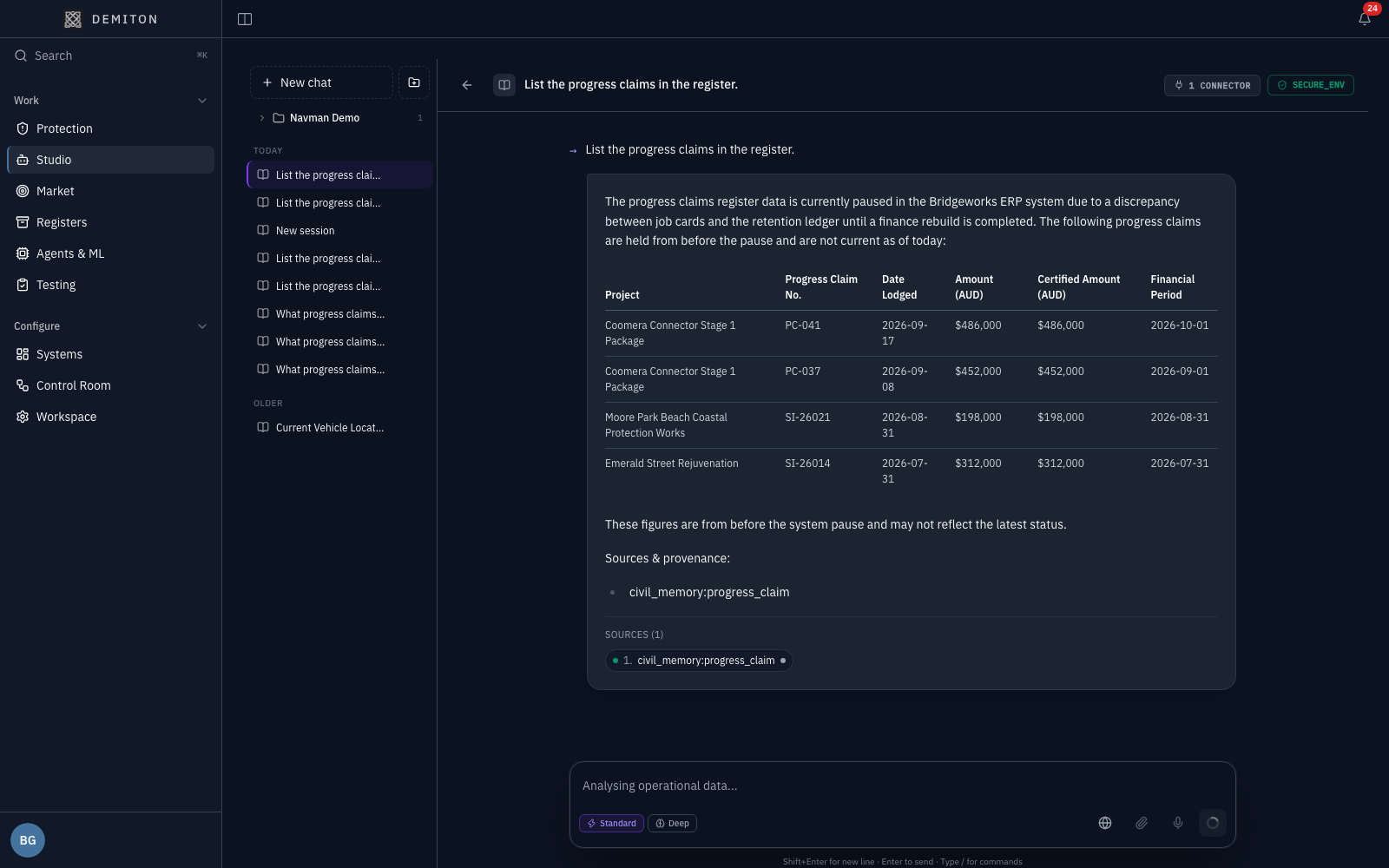
Section titled “Studio, and anything you ask”Ask a question that reads the register, and the answer says the figures are held from before the pause and are not current. It does not present them as today’s:
MCP clients, verbatim
Section titled “MCP clients, verbatim”A connected MCP client does not get a paraphrase. The tool result carries a SOURCE PAUSED instruction ahead of both the data and the no-data answer:
SOURCE PAUSED -- Bridgeworks ERP (D365_BUSINESS_CENTRAL) by Bridgeworks Demo Owneron 14 Oct 2026: "The job cards and the retention ledger disagree until the financerebuild lands." The facts below from progress_claim landed before then and are held,not current. Say this first; offer the figures, do not present them as today's.That is why the block comes before DATA FOUND and before NO DATA FOUND: a paused system must never read as “there is nothing here”.
Start it again
Section titled “Start it again”- Open the system’s page and click Resume harvests.
- The page returns to its live state, the chip and banner go, and the bindings table shows the next run again.
- The register’s Source card returns to its normal form, and questions about it are answered as current.
What a pause does not do
Section titled “What a pause does not do”- It does not delete anything. The facts already landed are held, and the registers keep them.
- It does not disconnect the system. Credentials and bindings stay as they were.
- It does not stop a harvest already in flight. That run finishes; nothing new starts after it.
- It is per system, not per register. Every harvest feeding that system stops, not one of them.
- It is not available for a system Demiton manages. That page has no pause control.
If it does not look paused
Section titled “If it does not look paused”A register fed by more than one system. The paused card appears on a register’s Source tab only when every system feeding it is paused. If another system still fills it, the register keeps its normal card, because the register itself is still being kept current. The paused one shows its state on its own page.
You can see the pause but not make one. Pausing needs connectors:manage. Readers see the chip, the banner, the reason and the held facts without it.
Talk to the team
Tell us what you run - your ERP, field, payroll and document systems - and we will show you the registers Demiton would fill from them, on your data, in a 30-minute call.